


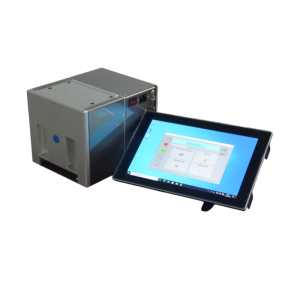
The following information will help you quickly determine whether TTO is right for your production line and which model is the best fit.
1. What type of packaging machine do you have?
Different packaging machines determine the TTO's operating mode; choosing the wrong one will result in the label either failing to apply or being misaligned.
| Your Packaging Machine Type | Corresponding to TTO mode | Note |
|---|---|---|
| Vertical Form-Fill-Seal (VFFS) Packaging Machine | Batch / Continuous | Most commonly used; supports both modes |
| Pillow-Style Packaging Machine (HFFS) | Continuous | Horizontal flow, continuous film operation |
| Page Sorter | Continuous | Continuous Separation of Labels or Cards |
| Filling Machine | Intermittent | Pauses during filling; suitable for intermittent printing |
💡 All you need to do is confirm whether the film is “moving” or “stationary” during printing. Select "Intermittent" for pauses and "Continuous" for continuous operation. Some models support both modes, offering a one-stop solution.
2. What material is your packaging film made of?
TTO is not suitable for all film materials; please verify that your film material is on the compatibility list.
| Membrane Material Types | Is it compatible? | Important Notes |
|---|---|---|
| PE (Polyethylene) | ✅ Compatible | Most commonly used, with good results |
| PET (polyester) | ✅ Compatible | Excellent results |
| OPP / BOPP | ✅ Compatible | Excellent results |
| NY (Nylon) | ✅ Compatible | Good results |
| CPP | ✅ Compatible | Good results |
| Aluminum-Coated Film (VMPET/VMCPP) | ✅ Compatible | Excellent results |
| Aluminum Foil Laminate | ✅ Compatible | We recommend using resin-based ribbons. |
| Paper-Plastic Composite Film | ✅ Compatible | Good results |
| PVDC (High-Barrier Film) | ✅ Compatible | Good results |
| Heat-Shrinkable Film (POF/PVC) | ✅ Compatible | The appearance after shrinkage needs to be tested. |
| Nonwoven Fabric | ⚠️ Needs testing | Rough surface; requires a high-sensitivity ribbon |
| Pure aluminum foil | ❌ Not recommended | We recommend using a heat-sealing embossing machine. |
💡 If you're unsure about a particular film material, we can provide free sample testing—simply send us a roll of the material for verification.
3. How fast does the membrane move? Does its speed fluctuate?
This factor directly determines whether the TTO can keep up with your production line.
| Situation | Note | Solutions |
|---|---|---|
| Constant speed (e.g., a constant 60 packages per minute) | TTO: Easy Integration | The standard configuration is sufficient. |
| The speed fluctuates (e.g., ranging from 30 to 80 packages per minute) | The TTO must have speed tracking capabilities. | Select a model with a synchronizer interface to automatically match speeds. |
| Extremely fast (over 120 packages per minute) | High demands on the ribbon and print head | Use a high-speed continuous TTO printer with a high-sensitivity ribbon |
💡 Speed fluctuations are an issue that many production lines overlook; please be sure to provide your speed range rather than an average value.
4. How many packages need to be printed per minute?
The print frequency determines the grade of TTO printer selected and the ribbon consumption.
| Prints per Minute | Recommended Configuration | Note |
|---|---|---|
| 30 or fewer times | Economy TTO | It's good enough and offers the best value for the price. |
| 30–80 times | Standard TTO | The Top Choice, Reliable Performance |
| 80–120 times | Standard TTO (High-Speed Version) | The cooling system needs to be upgraded. |
| 120 or more times | High-End, High-Speed TTO | A special assessment is required |
💡 The higher the frequency, the faster the print head and ribbon wear out; therefore, consumable costs must be taken into account when selecting a model.
5. What do you want to print? What are the dimensions?
The complexity of the content to be printed directly affects the requirements for resolution, print width, and ribbon type.
| The content you need to print | Minimum Resolution Requirements | Recommended Width |
|---|---|---|
| Production Date + Expiration Date (1–2 lines of text) | 200 dpi | 24mm is enough |
| Multiple lines of text + lot number (3 or more lines) | 200 dpi | 32 mm |
| Barcodes (Code 128, EAN, etc.) | 200 dpi | 32 mm |
| QR Code | 300 dpi | 53 mm (recommended) |
| Logo/Graphic Mark | 300 dpi | 53 mm or larger |
| Multi-column packaging (printing multiple contents simultaneously) | 300 dpi | 107/128 mm (wide) |
| Print Orientation | Note |
|---|---|
| Longitudinal (along the direction of film movement) | Most common; suitable for most production lines |
| Transverse (direction of vertical film movement) | You need to check whether there is enough space for installation. |
| Rotate/Tilt | Requires a customized assessment |
💡 Quick tip: If you're printing barcodes or QR codes, go with 300 dpi without hesitation. If you're only printing two lines of text, 200 dpi is sufficient.
6. Is there enough space for installation? Who provides the mounting bracket?
The TTO must be installed in the correct position on the packaging machine; improper installation can affect print quality and the equipment's service life.
| Inspection Items | Items You Need to Confirm |
|---|---|
| Installation Location | Is there sufficient space between the print head and the film surface (typically 5–10 cm)? |
| Installation Direction | Should it be installed horizontally or vertically? Does the packaging machine have mounting holes? |
| Bracket Accessories | Does the supplier offer a dedicated mount that fits your device? Or do you need to modify it yourself? |
| Air Supply | Pneumatic TTO models require a compressed air supply; electric models do not require an air source, eliminating the need for piping. |
💡 Our Approach: We provide detailed installation diagrams or conduct on-site surveys to ensure that the 100% mount is compatible with your equipment, eliminating the need for you to make any modifications yourself.
7. Can we make a sample first to see how it turns out?
“It’s better to see it for yourself than to just talk about it”—Be sure to check the actual print quality before making a purchase.
| You need to confirm | Why It Matters |
|---|---|
| Print Quality | Is the small text legible? Can the barcode be read by a barcode scanner? |
| Adhesion | Is the printed text easy to erase? Is it scratch-resistant and alcohol-resistant? |
| Speed Matching | Is the print quality consistent at your production line speed? |
| Membrane Material Adaptability | Do different batches of the same roll of film produce the same results? |
💡 We offer a free sample service: Send us a roll of film, and we’ll test it on our equipment and send you a sample for your approval. Place your order only after you’re satisfied.
8. Should I choose a standard ribbon or a resin ribbon?
If you choose the wrong ribbon, the print either won't come out at all or will peel off easily.
| Ribbon Type | Suitable Membrane Materials | Features | Price |
|---|---|---|---|
| Standard Wax-Based/Hybrid Ribbons | PE, PP, OPP, label paper | Suitable for everyday use; provides good adhesion | Economy |
| Resin-based ink ribbon | Aluminum-coated film, aluminum foil composite film, PET, nylon | Scratch-resistant, alcohol-resistant, and extremely adhesive | Higher |
💡 Not sure which one to choose? Tell us what type of film you’re using, and we’ll recommend the most compatible ribbon model right away to help you avoid trial-and-error and wasted effort.
Quick Self-Check List (Check the box √ to select the right model)
| No. | Question | Your Answer | Notes |
|---|---|---|---|
| 1 | Types of packaging machines? (Vertical / Pillow / Sheet Feeder / Filling Machine) | ________ | Key Items |
| 2 | Is the membrane in the “stop” or “run” state? | Batch/Continuous | Key Items |
| 3 | What material is the membrane made of? | ________ | Key Items |
| 4 | What is the production line speed range? (packages per minute) | ________ | Key Items |
| 5 | What to print? (Text/Barcode/QR Code/Logo) | ________ | — |
| 6 | Print size? (Width × Height) | ________ | — |
| 7 | Print orientation? (Portrait/Landscape) | ________ | — |
| 8 | Does the factory have compressed air? | Yes/No | Choose Electric or Pneumatic |
| 9 | Are there any special requirements? (Alcohol-resistant/scratch-resistant) | Yes/No | — |